
Import and export
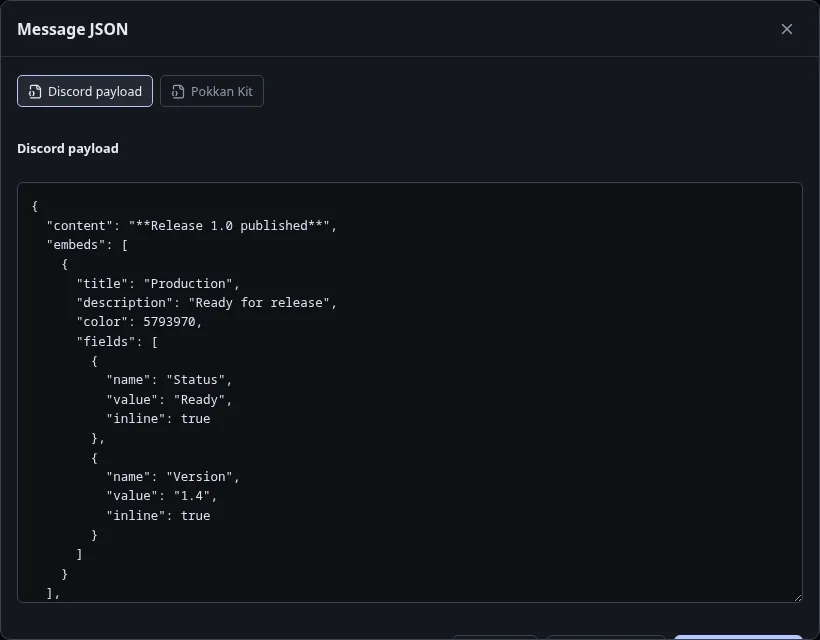
The editor’s JSON action is also its export tool. There is no separate Export menu.
Choose the right format
Section titled “Choose the right format”- Discord Payload: message data for Discord. It does not include the Kit name, arguments or Placeholder catalog. Validation can block export until errors are fixed.
- Pokkan Payload: a portable Kit, including the message and supporting Kit data. Use this for a backup or to continue editing later.
Choose Copy or Download after selecting the format. Copy requires browser clipboard permission; download is an alternative if clipboard access is denied.
Import a copy
Section titled “Import a copy”Open Kits, choose Import, enter a name, and paste your JSON. Import creates a new Kit rather than replacing another one. In an existing editor, Apply JSON changes that Kit; review your changes before saving.
Unsupported component data can remain in a Pokkan Kit, but Discord Payload omits components Pokkan cannot serialize. Read validation warnings rather than assuming both exports contain identical data.
Never include a webhook URL in JSON. The delivery credential belongs only in Send.
Next: Kits and drafts · Placeholders